 ProductInvestigation analytics
Product · Transport ticketing
Faremo
Every ticket. Every trip. One operating record.
Conductor ticketing and office fleet administration in one operating system. Issue tickets on a handheld, keep selling offline, manage routes and fares, and reconcile shifts, expenses and collections from the office.

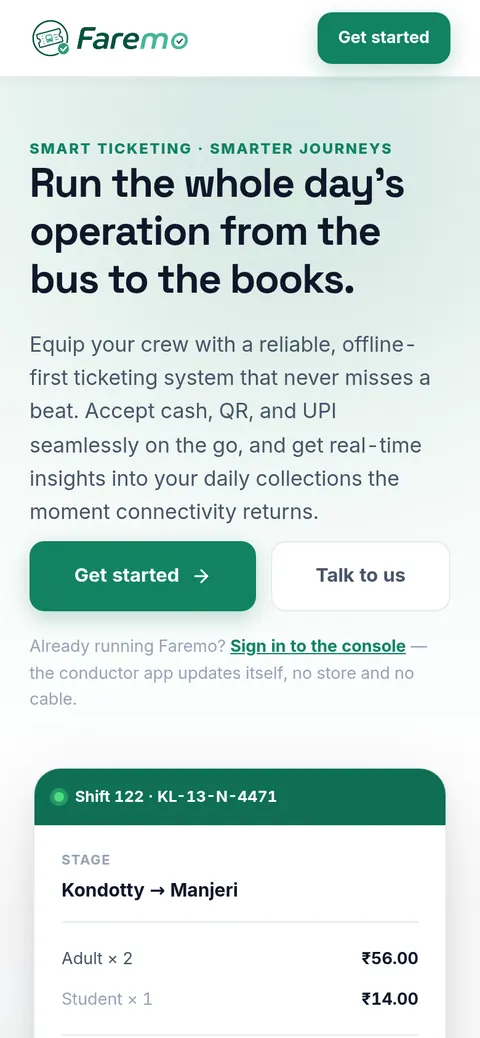
The faremo.in home page, captured November 2026.
- Offline
- ticketing on the road
- 1
- record from ticket to cash book
- Multi
- operator platform
What needed to change
Ticketing happens on moving buses with patchy connectivity, while the office needs dependable financial and operational records. Fare charts, crew registers, device records and cash books are usually scattered across paper and spreadsheets.
How we approached it
Faremo organises the operating day around linked records for the company, vehicle, device, crew, duty shift, trip and ticket, so the office can follow any collection total back to the duty and the individual sales that produced it.
The conductor starts a duty on a registered handheld, selects the bus, route and driver, and records opening values. Trips set the direction of travel and stage order; each ticket combines boarding and destination stages, passenger categories, quantities, fare rules and payment method. Sales are stored on the device and sent to the server through a retryable sync protocol. The office console covers fleet records, routes, fare publishing, crew accounts, device status, collection analysis, cash-book approval, notices, incidents, receipt design and billing, with each operator kept in its own company scope.
- 01Issue tickets
- 02Sync transactions
- 03Reconcile collections
Step by step
- 01
Operator setup
Provision a company and subscription, then configure buses, compliance, crew, routes, ordered stages, fare charts, ticket categories and registered devices.
- 02
Field ticketing
Conductors open a duty, start directional trips, choose boarding and destination stages, ticket category and quantity, record payment and print on supported thermal hardware.
- 03
Offline continuity
Locally generated identifiers make uploads safe to retry. Sync status separates sales saved on the device from those already in central reports, and fares are validated on the server.
- 04
Cash and daily closing
Record fuel, expenses and crew-pay rules, then reconcile cash and UPI by duty. Approved closes keep their accounting state.
- 05
Office reporting
Review trip history, collections, conductors, fleet compliance, device activity, incidents and renewals, with every report traceable to duty records.
What it does
- Operator onboarding and company administration
- Fleet records and compliance tracking
- Device registration and health
- Routes, stages and directions
- Fare administration and ticket categories
- Conductor shifts and trip lifecycle
- Ticket issue and thermal receipts
- Duty expenses, cash and UPI reconciliation
Business value
Connects ticket issue, trip activity, duty expenses and office reconciliation in a single record. Offline capture keeps routes selling; server-side sync and fare validation keep the numbers traceable.

